
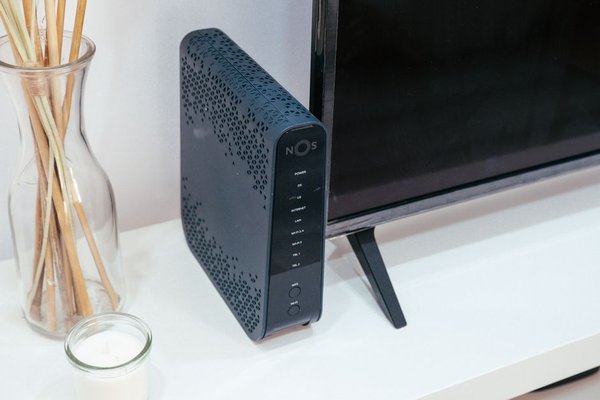
A modem and a router often sit next to each other, sometimes inside the same box, which makes it easy to assume they do the same job. They do not. A modem connects your home to your internet service provider, while a router creates and manages the local network your phones, laptops, TVs, game consoles, and smart devices use. In many homes, you need both functions even if one piece of equipment handles them together.
Understanding router vs modem roles makes shopping and troubleshooting easier, and helps you avoid replacing the wrong device when your connection feels slow.
What Does a Modem Do?
A modem is the device that connects your home network to the outside internet service delivered by your provider. Depending on the service, that connection may arrive through coaxial cable, a phone line, fiber equipment, or another access technology. The modem or equivalent network terminal converts that provider-side connection into a form your home network equipment can use.
With cable internet, the modem usually connects to a coaxial wall outlet and provides Ethernet on the home side. DSL uses a compatible DSL modem. Fiber is different: many providers install an optical network terminal, or ONT, which converts the fiber signal to Ethernet.
A basic standalone modem is not designed to provide whole-home Wi-Fi or manage many household devices.
What Does a Router Do?
A router takes the internet connection from the modem or ONT and shares it with devices inside your home. It creates your local network, directs traffic between devices and the internet, and usually provides firewall and network-management features.
Most consumer routers also include a wireless access point, which creates your Wi-Fi network. That is why “router” and “Wi-Fi” are often used almost interchangeably, even though they are separate functions.
If your phone uses Wi-Fi while a desktop connects by Ethernet, the router coordinates those connections. Guest networks, parental controls, device prioritization, and mesh expansion are also usually router features.
Modem vs Router: The Key Difference
The simplest way to remember the difference is this: the modem connects your home to the internet provider; the router connects your devices to each other and shares that internet connection among them.
Connection to the ISP
The modem communicates with your ISP’s access network. It must match the type of service you buy, and cable providers may require an approved model. A router is normally less tied to a specific provider because it sits on the home side of the connection.
Wi-Fi and Local Networking
A standalone modem usually does not create the Wi-Fi network used throughout your home. A typical home router does. The router also handles wired local connections through its LAN Ethernet ports.
Device Management
Your router is usually where you change the Wi-Fi name and password, create a guest network, review connected devices, or adjust local network settings. A modem may have a status page, but it generally offers fewer everyday household controls.
Do You Need Both a Modem and a Router?
For most conventional home internet setups, you need both internet-access functionality and routing functionality. They do not have to be separate boxes. Many ISPs provide a gateway that combines a modem and router. Some fiber providers instead supply an ONT plus a router or gateway.
A combined gateway is convenient because there is less wiring and one device for the provider to support. Separate equipment gives you more flexibility, including upgrading Wi-Fi without replacing the modem.
Before buying anything, check what your provider supplies and permits. Cable customers should confirm modem compatibility, while fiber customers should not assume they can replace a provider’s ONT with a retail modem.
A Real-World Example
Imagine a home with a 500 Mbps cable plan. The coaxial line connects to a cable modem. An Ethernet cable then runs from the modem to the router’s WAN or internet port. The router creates the home’s Wi-Fi network and can also connect wired devices.
If every device loses internet access but the Wi-Fi network name still appears, the router may still be working locally while the modem, ISP connection, or link between the two has a problem. If the modem shows a normal connection but Wi-Fi is weak only in distant rooms, replacing the modem is unlikely to help. Better router placement, a newer router, or a mesh system is more relevant.
That distinction can save money because it points you toward the equipment that actually affects the problem. Natural next topics include Wi-Fi router placement, Ethernet cables for home networks, and home network setup.
Separate Devices or a Combination Gateway?
Choose a combination gateway if simplicity matters most and you are satisfied with the provider’s features, support, and equipment terms. It can be a practical option for smaller homes or people who do not want to manage separate devices.
Choose separate equipment if you want more control, expect to upgrade Wi-Fi independently, or want a specific mesh ecosystem. Separate gear can also make troubleshooting clearer because each device has a distinct role.
There is no universal winner. The better choice depends on your service type, provider rules, home size, device count, Wi-Fi needs, and whether you value simplicity.
What to Check Before Buying Home Network Equipment
Start with your service type and provider requirements. A cable modem must support the provider’s network and your speed tier. For routers, Wi-Fi coverage, device count, Ethernet needs, security updates, and placement matter as much as the headline speed on the box.
Also check whether your current device is already a modem-router gateway. Adding another router may require bridge mode or another configuration to avoid unnecessary double routing. Looking up the model number on your existing equipment is a simple first step.
Frequently Asked Questions
Can I use a router without a modem?
Yes. A router can create a local network without a modem, but normal internet access still requires an upstream connection, which may come from a modem, fiber ONT, or another provider device.
Can I connect directly to a modem without a router?
In some setups, one computer can connect directly to a standalone modem by Ethernet, but this is rarely the best everyday arrangement. A router provides network sharing, Wi-Fi, firewall functions, and easier support for multiple devices.
Does a better router make internet faster?
A better router cannot make your ISP plan exceed its provisioned speed, but it can remove local bottlenecks. An old or poorly placed router may limit Wi-Fi throughput, range, latency, or performance when many devices are active.
Do fiber connections use a modem?
Fiber connections commonly use an optical network terminal rather than a traditional cable or DSL modem. The ONT converts the optical signal to a network connection that can feed a router or provider gateway.
The Bottom Line
When comparing a modem vs router, think of two responsibilities: getting the internet connection into your home network and distributing it to your devices. The modem, ONT, or similar provider-facing equipment handles the first job. The router handles the second, usually while also providing Wi-Fi.
Many households need both functions, but not necessarily two boxes. Once you identify what your provider already supplies and which device controls Wi-Fi, choosing upgrades becomes much more straightforward.